
Go live with confidence.
Service Transition & Readiness operationalises ITIL service transition inside Jira Service Management: weighted readiness scoring, auditable go/no-go gates, phased transition plans and early-life support with real incident evidence.
Jira Service Management runs your incidents. It does not run your transitions.
Everything between "the project says it's built" and "the service desk owns it" tends to live outside the tool — in spreadsheets, Confluence checklists and meeting minutes. That is exactly where the risk hides.
The readiness spreadsheet nobody trusts
A tab per service, last updated three weeks ago, owned by whoever set it up. It answers "what did we tick?" — never "is this actually ready, and who says so?"
Gate decisions with no paper trail
Go/no-go happens in a meeting and lands in minutes, chat, or nowhere. When an incident lands in week two, nobody can say what was known, or agreed, at sign-off.
Handover as an event, not a process
Services get thrown over the wall on go-live day. Early-life support is informal, exit criteria are implicit, and the service desk inherits whatever arrives.
Four modules, one lifecycle
Each stage produces the evidence the next one needs — and the portfolio view rolls all of it up for CAB.
Readiness assessments
Score a service against weighted criteria grouped into categories — support model, knowledge, monitoring, security, training. Every criterion carries a weight of 1–10 and an optional evidence link, so "are we ready?" becomes a number you can defend.
Go / No-Go gates
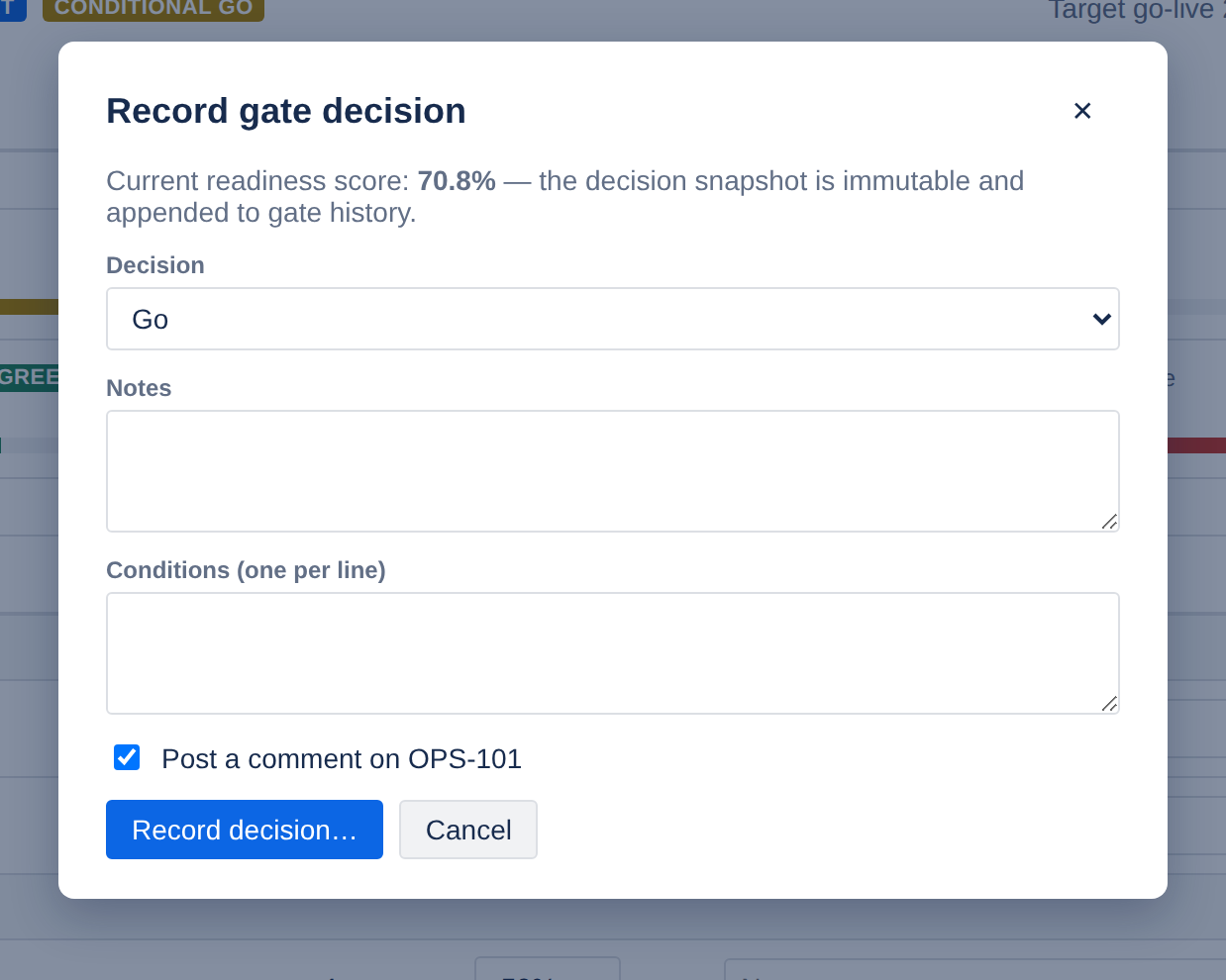
Record Go, Conditional Go or No-Go with the decider, timestamp, notes and conditions. Each decision snapshots the score it was made against and is immutable — there is no edit or delete path, by design.
Transition plans
Phased plans for knowledge transfer, support model, monitoring onboarding, training and go-live prep. Owners, due dates, linked Jira issues, and health rollups that recompute server-side on every write.
Early-life support
Run the warranty period properly: exit criteria with who-ticked-what, audited extensions with a reason, and a daily incident trend pulled from your own JQL so handover to BAU is evidence-based.
A score you can defend in a CAB
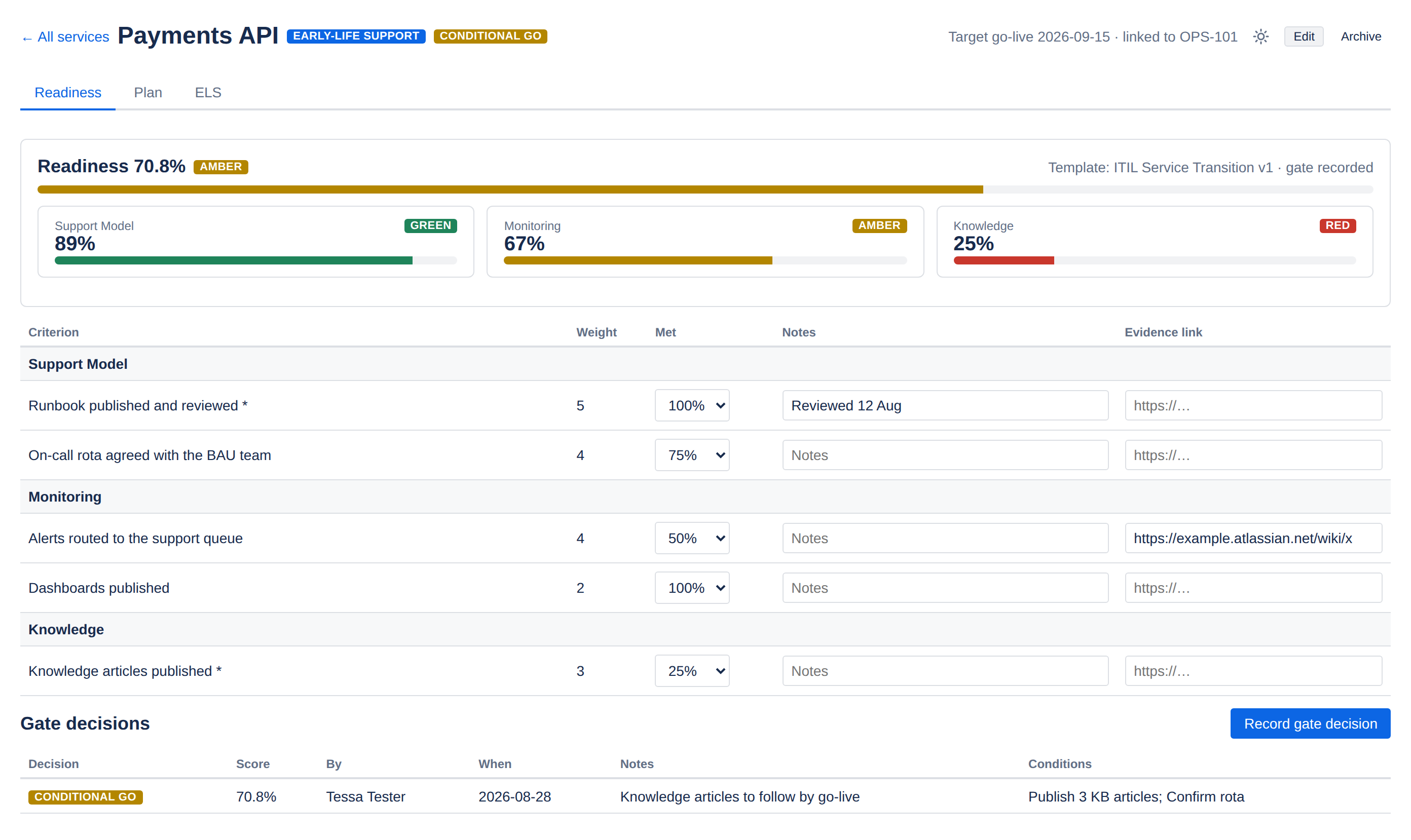
Criteria are weighted 1–10 and scored on a 0/25/50/75/100 "met" scale, with notes and an evidence link on each line. The app computes the weighted total and a per-category breakdown, then bands it red / amber / green against thresholds you set.
- Reusable templates, versioned on every edit — an in-flight assessment keeps the version it started with
- Mandatory criteria and "evidence required" flags for the lines that must not be waved through
- Category scores expose where a service is weak, not just that it is
- Optimistic concurrency, so two people scoring at once cannot silently overwrite each other

Warranty periods that actually mean something
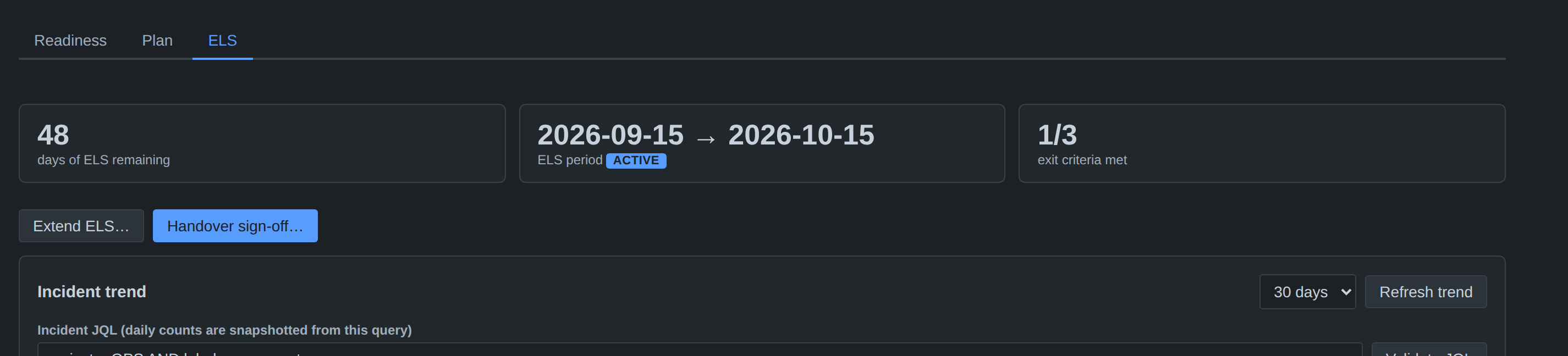
Define the ELS window after a Go decision, point it at a JQL query for the service, and the app snapshots created, resolved, open and P1 counts every day. Handover to BAU becomes a decision backed by a trend line rather than a calendar date.
- Validate your JQL live before saving it — see the current match count
- Extensions require a reason and are appended to an audit log
- Sign-off is blocked while mandatory criteria are unmet; overrides are recorded with the criteria they bypassed
- Signing off moves the service to Live and stamps the go-live date
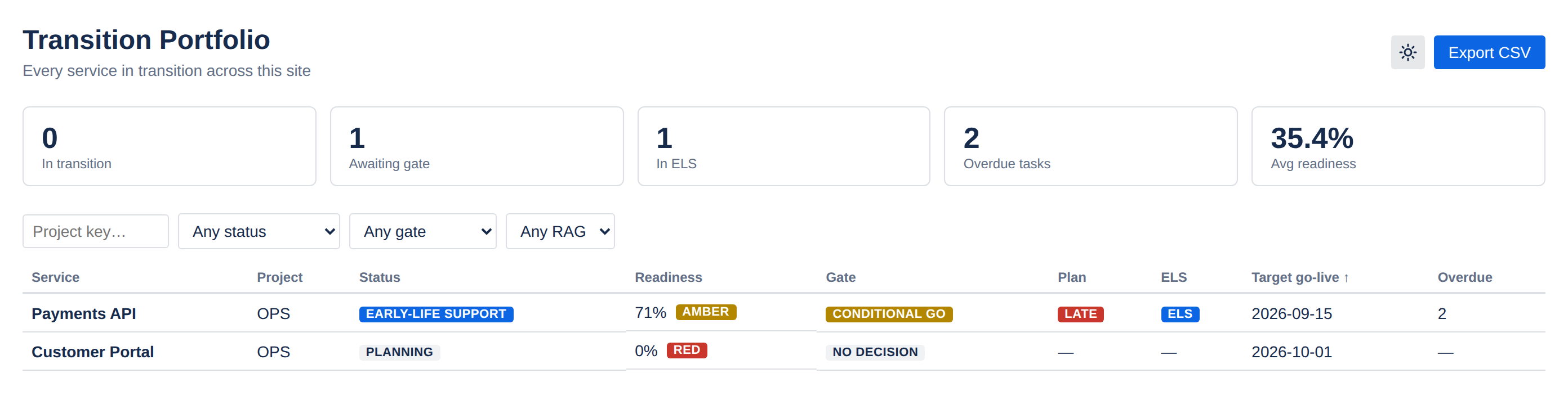
Every transition on the site, on one screen
Summary tiles, filters by project, status, gate and RAG band, sortable by score or go-live date — and a CSV export for the review pack.
Built around the four people in every transition
Service Delivery Manager
Standard gates, evidence for CAB, and a portfolio view across every project.
Transition Manager
Plan tracking with owners and dates, and rollups that stay honest.
Service Desk / Ops Lead
A real veto at the gate, plus exit criteria and incident trend before accepting handover.
ITSM Tooling Admin
No new infrastructure, four scopes, and a security review that finishes quickly.
Your security review will be short
The app is built entirely on Atlassian Forge. There are no external servers, no remotes, no egress permissions and no third-party services. Compute and storage are Forge-hosted, so your data stays in your Atlassian site and inherits its data residency.
- Four scopes, each mapped to features you can see — no admin scopes
- Jira reads run as the signed-in user: nobody sees issue data the app's permissions would not already allow
- The only personal data stored is Atlassian account IDs plus display names captured at sign-off, for the audit trail
- CSV exports are escaped against spreadsheet formula injection
Stop guessing whether a service is ready
Bring readiness scoring, gate sign-off and early-life support into the tool your teams already run transitions in.
Pricing and trial details are on the Atlassian Marketplace listing.